-
-
Accessing our Wi-Fi
Wireless Internet (Wi-Fi) access is available throughout the library.
- Our open network is HPPL. No password is required.
- A secure network, HPPLS, is also available. Ask for the password at any service desk.
Learn more about securing your mobile device & understanding security on the Internet.By using our Wi-Fi, you agree to the terms of our Internet Access Policy.
-
-
-
Computers for Adults
The Adult Services computer lab offers Internet access, Microsoft Office, scanning stations, and a printer. All you need is a library card. Computers in the Adult Services area are open to anyone in high school or older.
-
Computers for Children
The Youth Services computer lab offers Internet access, Microsoft Office, and a printer. All you need is a library card. The Early Literacy area has iPads and AWE Learning stations with educational software and apps. Computers in the Youth Services area are open to anyone age 14 and younger.
-
Laptops
The library has several laptops with Microsoft Office which can be checked out for in-Library use at the Computers and Technology desk.
-
-
-
Printing from a Laptop or Home Computer
To send print jobs from your laptop or home computer visit Highland Park Public Library’s PrinterOn
- Black and white printing costs 10¢ per page
- Color printing costs 25¢ per page
- Print jobs can be retrieved up to 15 minutes prior to closing time the day they are sent
- Print jobs not retrieved prior to closing will be deleted from the queue
- Retrieve print jobs from the computer lab printer in Adult Services
-
Printing from a Mobile Device
To print an email message or attachment, simply forward your email to
Black and White:
hpplprint-bw@ewprints.comColor :
hpplprint-color@ewprints.comYou will be sent a release code for the email message and each attachment. Use these release codes to retrieve your documents.
- Black and white printing costs 10¢ per page
- Color printing costs 25¢ per page
- Print jobs can be retrieved up to 15 minutes prior to closing time the day they are sent
- Print jobs not retrieved prior to closing will be deleted from the queue
- Retrieve print jobs from the computer lab printer in Adult Services
-
-
-
The Internet and the Library's mission
The Highland Park Public Library offers access to the Internet, a worldwide electronic information network. It is offered in support of the Library's mission to provide materials, resources, and services to help community residents obtain information to meet their educational, professional, cultural, and social needs. The Internet presents the Library with an unprecedented opportunity to fulfill its mission by expanding the scope of information available to community residents.
-
Global nature of the network
As Internet resources are "global" in nature, the Library does not, and can not, control the information available.
The Library encourages patrons to evaluate carefully the information obtained via the Internet. While there are many highly dependable and useful sources, other sources may be unreliable, inaccurate, or out-of-date. Some sources may be offensive or controversial. Library staff is available to assist users in making judgments about the reliability or currency of certain types of information and sources, but cannot provide a definitive analysis of particular sources.
- As with all materials, Library staff will help patrons locate sources of useful information, as well as recommend age-appropriate materials for children.
- The Library is not responsible for any direct or indirect damages which may arise in connection with a patron's use of the Internet.
-
Patron responsibilities
It is the Library's view that patrons should be free to select the sites which they deem appropriate to their needs.
Internet content is protected by the First Amendment which guarantees the freedom of speech. The Library does not use filtering software for information content. Individual users have the right to define what material or information is consistent with their personal beliefs.
The Library does not deny access to electronic information networks based solely on age. Parents are encouraged to monitor and supervise their children's use of the Internet and to discuss with their children issues of appropriate use and network safety.
Patrons are prohibited from damaging or altering computer equipment or software or connecting their own hardware to the library's data network; violating system security; violating licensing agreements; using the network to harass other users; violating a Federal or State law including, but not limited to, accessing material that is obscene or child pornography as defined by the Illinois Criminal Code, 720 ILCS 5/11-20 & 720 ILCS 5/11-20.1.
The use of the Internet falls under the Library Behavior Policy.
-
Library procedures
The Library may set procedures to assist staff and patrons in the use of electronic resources. Such procedures include, but are not limited to, the following: time limits for access; limits on the use of e-mail and chat rooms; cost recovery for printouts; specific instructions for downloading; restrictions on the use of personal software on Library computer equipment; restrictions on the use of the workstations for other purposes.
Use of the Internet in the Youth Services Department is limited to children age 14 or younger.
-
Breach of policy
Violation of any aspect of this policy (or of established Library procedures) may result in loss of Library privileges.
-
Technology at the Library
We are your neighborhood technology center.
- Get help navigating that new gadget
- Find a computer to use when yours is in for repair.
- Access the latest technologies like 3D printing, augmented reality headsets, and mobile webcams
- Use our Digital Media Center to transform your old media such as photos, slides, or VHS tapes to the latest formats.
- Borrow a projector for your next meeting.
- Develop a website or create a podcast.
- And much more.
You can do it all at the Library. Contact our Media Services Department at 847-681-7032 for your technology needs.
-
-
3D Printing
The Library desires to offer community access to new and emerging technologies such as 3D printers to inspire a new interest in design and help the community to bring their ideas to life. The Library’s 3D printer is available to the public to make three-dimensional objects in plastic using a design that is uploaded from a digital file. More on the 3D Printer
-
Submit a Print Online
3D printing is available for Highland Park Public Library card holders only. Files must be in .stl, .obj, or .3mf format only. See our submission procedures.
-
Design Resources
-
-
-
Digitize, Design, Discover
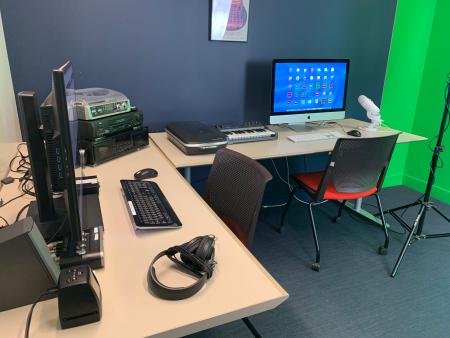
The Library's Digital Media Lab offers the space, equipment, and software for you to get creative with video, music, graphic design, 3D scanning, and more. Bring your ideas to life! Learn more.
-
